shortcut tricks for using brouser

Most of the people work on internet, keyboard is mostly used for typing website URL (address) and if your typing speed is good you can save some time but if you know some browser trick you save some more time.

Normal addresses of any website like -
http://www.Bugjee.com

Normally http:// is automatic type every time when your type any website address in address bar / Location bar.

But if you can type automatically www. & .com/.org/.net with simple trick

www.example.com
Type only example in address bar / Location bar then press Ctrl + Enter and you will get www. & .com automatically
Work with – Firefox, opera, Internet Explorer -6, 7, 8, Google Chrome, Safari
www.example.net
Type only example in address bar / Location bar then press Shift + Enter and you will get www. & .net automatically
Work with – Firefox
www.example.org
Type only example in address bar / Location bar then press Ctrl + Shift + Enter and you will get www. & .org automatically
Work with – Firefox
Now you can see that you can save 8 Keystrokes every time when you open one website and in this situation Firefox is best because it also support .org & .net shortcut.
Bookmarks and browser home page is another options for saving some keystrokes.

Do you like this post.??? If yes then comment me ..........Thanks!!!

Read rest of entry

How to block specific website without using any software

You can block any website in windows vista, seven and xp with this small trick. You don’t need any software for it and when you are trying to open any specific website in browser like internet explorer, Firefox, safari, chrome or opera, it does not open.

Follow these instructions-

Browse C:\WINDOWS\system32\drivers\etc\
Find the file named “HOSTS”
Open it in notepad
under “127.0.0.1 local host” and add website like this-

127.0.0.1 www.example.com

127.0.01 example.com

If you want to block example.com, add both line your hosts file because some of the website also open without www.

http://www.example.com

http://example.com

If you don’t edit your file directly in windows vista & seven, first you need to copy your hosts file in other drive( except c drive) and then edit and replace your hosts file with original host file.

You can also understand with this example you can see here when you want to block orkut, add both domain -

www.orkut.com

www.orkut.co.in – it is a default domain for Indian region.

Now check your browser and that site will no longer be accessible.


please comment me on this post thanks..!!!

Read rest of entry

shortcut keys of Firefox

Most of the people run window operating system and the main fact is that they also use internet explorer because internet explorer is a default browser of window os.

I also know that Mostly users of window operating system use internet explorer but some of the people try Firefox and leave again this because addiction of internet explorer look but this is not a good choice where security and time is main things in these days. so Don’t leave Firefox only on this basis where you addict with internet explorer look & graphical design because tone of the features are available and waiting your mouse clicks and you can also customize Firefox according to your desire.

You can also look some other fact if you are a window xp user your internet explorer version 6.xx and this version does not support tab browsing and if I talk my own self today I don’t work without tab browsing which save my thousands of hours which spend on internet.

Internet explorer 7.xx & 8.xx version support tab browsing but why don’t you try Firefox (3.x.x, English (US), Windows (7.1MB))

So why do you try only one time and leave it please try it 10- 20 times and you can find this is a right choice for you and your work which you done with internet every day.

If you are totally new in Firefox you can try Firefox with some of the top shortcut keys which save your internet surfing time and increase your productivity.

Ctrl + T

Open new tab in same window when you want to open new website.

Ctrl + Shift + T

Reopen any tab which accidentally closed or closed by you or undo close tab.

Ctrl +shift + Delete

Clear Private Data Now, When sometimes few site don’t open properly due to some cache & cookies problem but after clear this data you can open website without any problem.

Ctrl + j

You can open your downloaded file quickly with this option.

Ctrl + L

If you open many website this option is more batter except mouse clicks.

Ctrl + F

Every website has own search bar for searching any matter but if you want to search in any webpage (very long page like Wikipedia) this may be helpful for you.

Ctrl + shift + D

You can bookmarks all your open tab in one time with some specific folder, this is good for you when you work on any topic or subject and suddenly go to other place so when you close your Firefox use this shortcut key and Firefox add your all open tab as a bookmarks for you in seconds.

Ctrl +w

You can close your opened tab quickly then mouse click.

Ctrl + +, Ctrl + – Ctrl +0

If you have wide screen monitor and you want to take full utilization of your monitor to maximize your opened web page or your Grandmother/ Grandfather or other person which has weak eye side and don’t read webpage text due to small size of text this option is good for you.

F11

You can maximize your Firefox window size with it and you can more concentrate your opened web page without affecting other opened program & task bar.


please comment me if u like this.......!!! Thanks..!!!

Read rest of entry

Why & how ,Full utilization of Firefox with shortcut keys

Most of the people run window operating system and the main fact is that they also use internet explorer because internet explorer is a default browser of window os.

I also know that Mostly users of window operating system use internet explorer but some of the people try Firefox and leave again this because addiction of internet explorer look but this is not a good choice where security and time is main things in these days. so Don’t leave Firefox only on this basis where you addict with internet explorer look & graphical design because tone of the features are available and waiting your mouse clicks and you can also customize Firefox according to your desire.

You can also look some other fact if you are a window xp user your internet explorer version 6.xx and this version does not support tab browsing and if I talk my own self today I don’t work without tab browsing which save my thousands of hours which spend on internet.

Internet explorer 7.xx & 8.xx version support tab browsing but why don’t you try Firefox (3.x.x, English (US), Windows (7.1MB))

So why do you try only one time and leave it please try it 10- 20 times and you can find this is a right choice for you and your work which you done with internet every day.

If you are totally new in Firefox you can try Firefox with some of the top shortcut keys which save your internet surfing time and increase your productivity.

Ctrl + T

Open new tab in same window when you want to open new website.

Ctrl + Shift + T

Reopen any tab which accidentally closed or closed by you or undo close tab.

Ctrl +shift + Delete

Clear Private Data Now, When sometimes few site don’t open properly due to some cache & cookies problem but after clear this data you can open website without any problem.

Ctrl + j

You can open your downloaded file quickly with this option.

Ctrl + L

If you open many website this option is more batter except mouse clicks.

Ctrl + F

Every website has own search bar for searching any matter but if you want to search in any webpage (very long page like Wikipedia) this may be helpful for you.

Ctrl + shift + D

You can bookmarks all your open tab in one time with some specific folder, this is good for you when you work on any topic or subject and suddenly go to other place so when you close your Firefox use this shortcut key and Firefox add your all open tab as a bookmarks for you in seconds.

Ctrl +w

You can close your opened tab quickly then mouse click.

Ctrl + +, Ctrl + – Ctrl +0

If you have wide screen monitor and you want to take full utilization of your monitor to maximize your opened web page or your Grandmother/ Grandfather or other person which has weak eye side and don’t read webpage text due to small size of text this option is good for you.

F11

You can maximize your Firefox window size with it and you can more concentrate your opened web page without affecting other opened program & task bar.


please comment me if u like this.......!!! Thanks..!!!

Read rest of entry

How To: Format PenDrive With NTFS File Systemin windows xp

When you try to format pendrive in Windows XP, you don’t found NTFS option in format Window. So first active this option in Windows XP, So that you can format your pen drive in NTFS.


Follow these steps to format in NTFS file system
1.Right click My Computer and select Properties.
2.Choose Hardware Tab and select the Device Manager.


3.Click on Disk drives and selects your pen drive.
4.Right click the pen drive icon and select properties.


5.Choose Policies tab and select the “Optimize for Performance” option
6.Click ok


7.Open My Computer
8.Right click pen drive icon and select format.
9.Choose NTFS in the File System dropdown box.


10.Finally Click start and you have done...............!!!

Don't forgetto comment if you like this tricks. Thaks!!!
Read rest of entry

How to Add Recent Posts Widget to Blogger

Widget to Blogger(blogspot) blogs using Feedburner's BuzzBoost service.

Do the following steps:

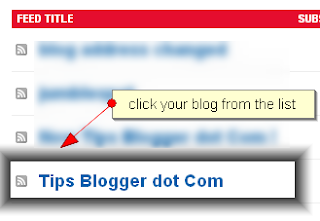
  1. Sign-in to your feedburner account and select your blog from My Feeds:
    How to Add Recent Posts Widget to Blogger

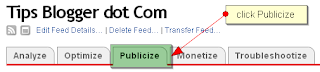
  2. Click Publicize tab from the top menu:
    How to Add Recent Posts Widget to Blogger

  3. Then select BuzzBoost from the left sidebar:
    How to Add Recent Posts Widget to Blogger

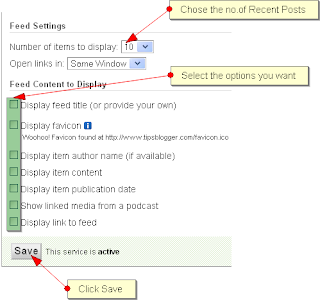
  4. Next you have to chose the number of recent posts you want to show, then select the optional items from the list and click Save:
    How to Add Recent Posts Widget to Blogger

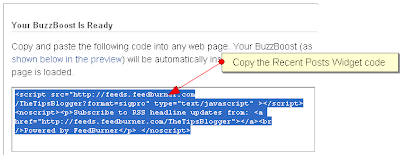
  5. Now you have to Select the widget code from the top box and Copy it:
    How to Add Recent Posts Widget to Blogger

  6. Then go to Blogger Layout Page - click Add a Page Element/Add a Gadget - select HTML/Javascript - then Paste the code and click Save. Finished!


You will see your Recent Posts Widget according to your Template's design and color! Happy Blogging!2 Thumbs Up

Drop Comments!
Read rest of entry

making dropdown menu for blogspot

A blog reader asked (desperate) for a way to create a pull down menu for his posts of recipes. I have got good and bad news for him. The good news is that there is a simple way to get a drop-down menu. Use Drop-down Menu Generator, which I used to generate a script to paste into a HTML/Javascript Page Element. The bad news for me is that the width of the drop down menu is dependent on the description (post title or anchor text) you put for the link to the post. I used it to do a drop-down menu for the posts in this blog: Food, Drinks and Recipe. It is at the top of the main column and will be displayed in the main page as well as the individual post pages (permalinks). I had originally planed to put it in the sidebar, but because the post titles were long, the width of the drop-down menu generated was too wide for the sidebar, so I had to put it above the main column. If you want something similar, you will need to know how to add an extra "Add a Page Element" for the main column.

The bad news for him is that there is only a limited number of posts he can put in the drop-down menu, and I doubt that would be sufficient for his long list of recipes. However, I suppose this drop-down menu can still be useful for making drop-down menus like for blogs, etc.

If he is still interested in doing it, this is how to proceed to generate the drop-down menu. For this task, it will be helpful to use a browser like FireFox which have tabbed browsing. In one tab, log into the Blogger account and click "POSTS" for the relevant blog. A page with with a list of posts will appear. Right click on "VIEW" on one of the post and select "Copy Shortcut" to copy the post URL into the clipboard.

Blogger Dashboard with list of posts of a blog

Open another tab and surf over to Drop-down Menu Generator. Paste the URL into the "Link URL" field. Then type the title of the post into the field for "Text shown". Continue the same process until you have entered all the post you want to appear in the drop-down menu, or you run out of fields to paste the Link URL.

Drop-down menu generator

Click on "Generate" and the script will be generated into the window below. Highlight all the script, copy into clipboard, then in the tab for the Blogger account, paste it into a HTML/Javascript "Add a Page Element" window and save.
Read rest of entry
 

WEB CREATION Copyright © 2009 Blog is Designed by Suvanno Tharu Sponsored by Hitsweb Pvt.Ltd